
AI Automation · Workflows
Workflow Automation
The steps between teams, approvals and systems, run as one governed process instead of a chain of handoffs.
What it is
Workflow automation is the part between the steps
Most processes are automated at the steps and manual at the joins. Workflow automation takes the joins: who gets the work next, how long they have, what happens when they do nothing, and how the result gets back to whoever asked.
An invoice is approved, but the approval is a reply in a mailbox and the posting is still waiting. A vendor is verified, but the master record appears three days later when someone gets to the ticket. The steps were done. The gaps between them were owned by nobody, which is why they are where the time goes. Workflow automation models those gaps once, as queues, approval routes, delegation, clocks, escalation and handoffs, and runs them the same way every time, as one governed process with a record of each step.
Three capabilities on this site are easy to confuse. Intelligent Process Automation is the whole process, with the document reading and the decision rules included. Enterprise Automation is AI working inside the ERP, CRM and applications you already run. Workflow automation is narrower than the first and sits in front of the second: the routing, timing and control layer between the steps, whichever agent, rule, system or person performs each one. What makes it AI workflow automation rather than a form router is that agents clear the steps that need no judgement, and a confidence score decides whether an item needs a review step at all.
The honest limit is that an engine cannot run a policy nobody wrote down. In most first projects the approval matrix on paper and the one in use turn out to be different documents, and at least one step exists only because of a mistake somebody made years ago. We model the route as it is actually run, put a clock on every step, and take out the steps the record shows are not earning their place. How a process is modelled and audited on the engine is described on the Workflow Orchestration page.
Where it applies
Six workflows that cross a team boundary
The test is whether a step waits on somebody in a different team or system. If it does, there is a handoff worth automating. These six come up most.
Finance
Invoice approval
Routed by value band, cost centre and variance to the approver the policy names. Cover applies while they are away, the clock escalates when they do not act, and every decision carries a reason.
Finance
Payment release
A maker prepares the run, a checker releases it, and the cut-off is enforced rather than remembered. The payment file is produced on release and the status comes back to each invoice.
Documents
Review queues
A field read below its confidence threshold lands in a queue with the field named, an owner and a clock. Review becomes a step with a time limit rather than a mailbox.
Procurement
Vendor onboarding
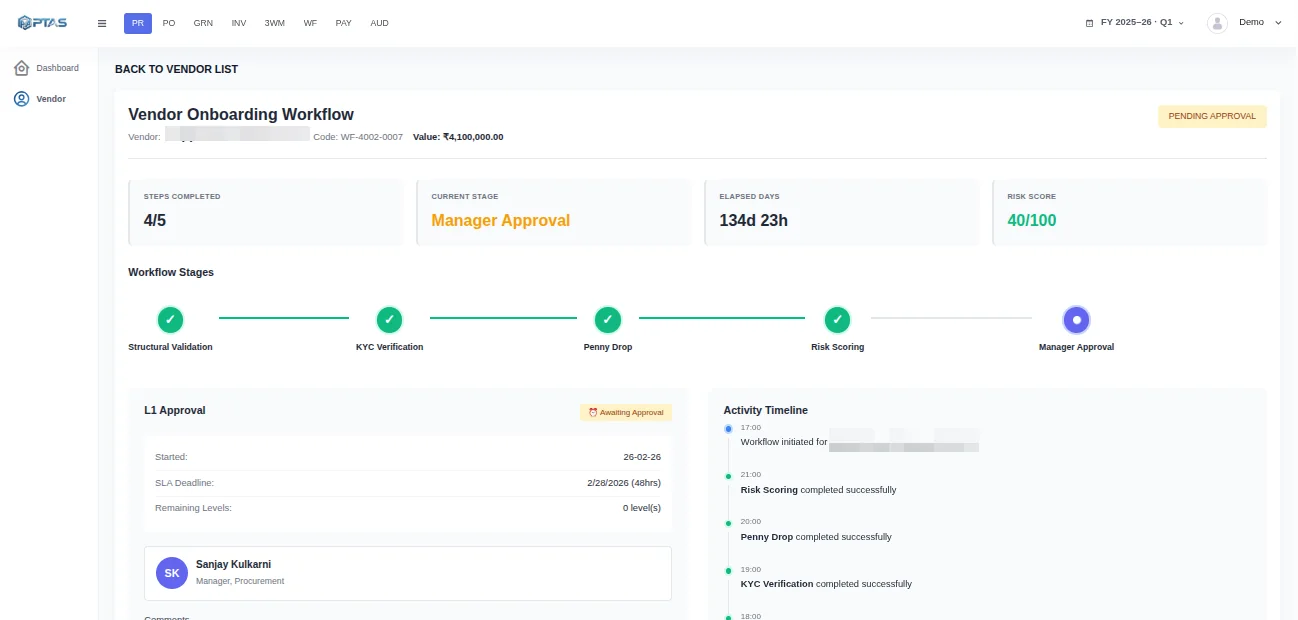
Procurement raises the request, finance verifies the GSTIN, PAN and bank details, and the master record is created once the last approval lands. Three teams work one case, with the evidence from each step attached.
Procurement
Requisition to purchase order
The budget owner first, then procurement, then the order raised in the ERP. The requester can see which step it is on without sending an email to ask.
Operations
Goods receipt discrepancies
A short delivery recorded at the gate holds the matching invoice line, opens a task for the buyer, and clears itself when the credit note arrives, or the rest of the goods do.
How PTAS AI runs it
How a case moves from arrival to close
Understand, decide, act and verify are the four moves every PTAS AI capability runs. In a workflow the thing understood is a case: what arrived, where it is, who has it and for how long.
-
01
Understand
Each item that arrives becomes a case: what it is, which workflow it belongs to, which entity and cost centre it touches, and what the rules or agents have already established.
An invoice → a case with a band, an owner and a clock
-
02
Decide
The route is read from your policy as configured: the band the value falls into, who approves for that entity, whether cover is active today, and which steps a clean item may skip.
Band → approver, with the delegation in force
-
03
Act
The task is raised with the person named, the notification sent and the clock started. When they act, the next step opens. When they do not, the item moves to the next name.
Decision → task, notification, clock
-
04
Verify
The posting is confirmed in the system of record and the status goes back to the queue. The case keeps every step with who took it, when and why.
Case → a record that says who approved what, and when
Worked example
An approval workflow, as the record shows it
Approval routing is where most of the waiting happens, so it is the step worth showing. The checks ran first, the band chose the approver, cover applied because the first name was on leave, and both names and timestamps are on the entry.
Invoice ₹ 2,70,220 — the route it took · Illustrative example
Nobody shared a login and nobody chased by email. The delegation, the timestamp and the reason are all on the entry.
Bands are yours
Value, cost centre and category decide the route. Change a band and the route changes with it.
Cover is a rule
Delegation has a name and a date range, and the decision records who acted under whose authority.
The clock is visible
Every open step shows how long it has waited and when it escalates. The queue is sorted by that rather than by arrival.
Controls
What the route enforces
A workflow that can be bypassed is a suggestion. These four hold because the engine enforces them, and the record shows when each one was applied.
Segregation of duties
Whoever raises or codes an item cannot approve it, and the approver cannot release the payment. Roles are checked at each step rather than assumed from the org chart.
Clocks and escalation
Every step has a time limit you set. When it runs out the item moves to the next name, and the wait is recorded against the step that caused it.
Who may change a route
Bands, routes, delegations and clocks are configuration behind role-based access. A change is versioned and recorded as an event of its own, and watching is a different permission from editing.
A complete case record
What arrived, what the rules established, who was asked, when they answered and what was posted, kept together and exportable for internal and statutory audit.
Product connection
Where the workflow runs
Queues, routes and clocks are platform features. The finance workflows that use them come configured in FinSuite, and both keep the same record. You meet the engine through whichever product your work starts in.
FAQ
Questions teams ask about workflow automation
How is this different from the workflow built into our ERP?
ERP workflow covers the steps inside the ERP. The waiting happens around it: in the mailbox where the invoice arrived, with the approver who is on leave, in the ticket queue where the master record gets created. PTAS AI runs the route across those places and writes the result back to the ERP through native, API, file or custom integration; which method fits your instance is confirmed during assessment.
Does the AI approve things, or do people?
People approve whatever your policy says needs a person. The workflow gets the item to the right person with the evidence and the reason it stopped, and makes sure it does not sit there unseen. Agents and rules clear the steps that need no judgement: the duplicate check, the match, the routing itself. We would rather start with more human gates than fewer and remove them as the record earns it.
What happens when an approver does not respond?
The clock on the step runs out and the item moves to the next name on the route, with a reminder before that if you want one. The wait is recorded against the step, so a month later you can see where items stall and with whom. An item never proceeds because nobody answered. A payment whose clock runs out stays held and escalates.
Can we change a route without a developer?
Yes. Bands, approvers, delegations, clocks and the order of steps are configuration, edited by the roles you allow and versioned so the previous route is kept. The change is itself a recorded event, which matters at audit time: the record shows an invoice followed the route in force that day, and who changed the route the week after.
How long does a first workflow take to go live?
Typically four to twelve weeks for a single workflow; an indicative range that varies with document variety, systems, approval design and deployment. The first two weeks usually go on writing down the route as it is actually run, which is often the first time anyone has. Teams normally start on one entity or one queue and widen once the record holds.
Keep reading
Related capabilities and solutions
AI Automation
The section this page belongs to, and the other five capabilities.
Read more →Intelligent Process Automation
The whole process, with document AI and decision rules included and workflow as one layer of it.
Read more →Enterprise Automation
The same routes run inside the ERP, CRM and applications your teams already use.
Read more →Business Process Automation
Fragmented manual steps replaced by one workflow you can see and measure, described as a solution.
Read more →Next step
Name the step that waits longest
Tell us which approval, review or handoff sits with a person the longest. The assessment maps it to a route with a clock on it, and says plainly which steps should stay manual.